
RichPad
Convenient reporting tool for technical professionals.
Have you ever had to:
-
Decipher a printed spreadsheet from your colleague.
-
Inherit a painstakingly-built technical codebase... with poor documentation.
-
Juggle tools that do half of what you need but don't communicate.
Us too.
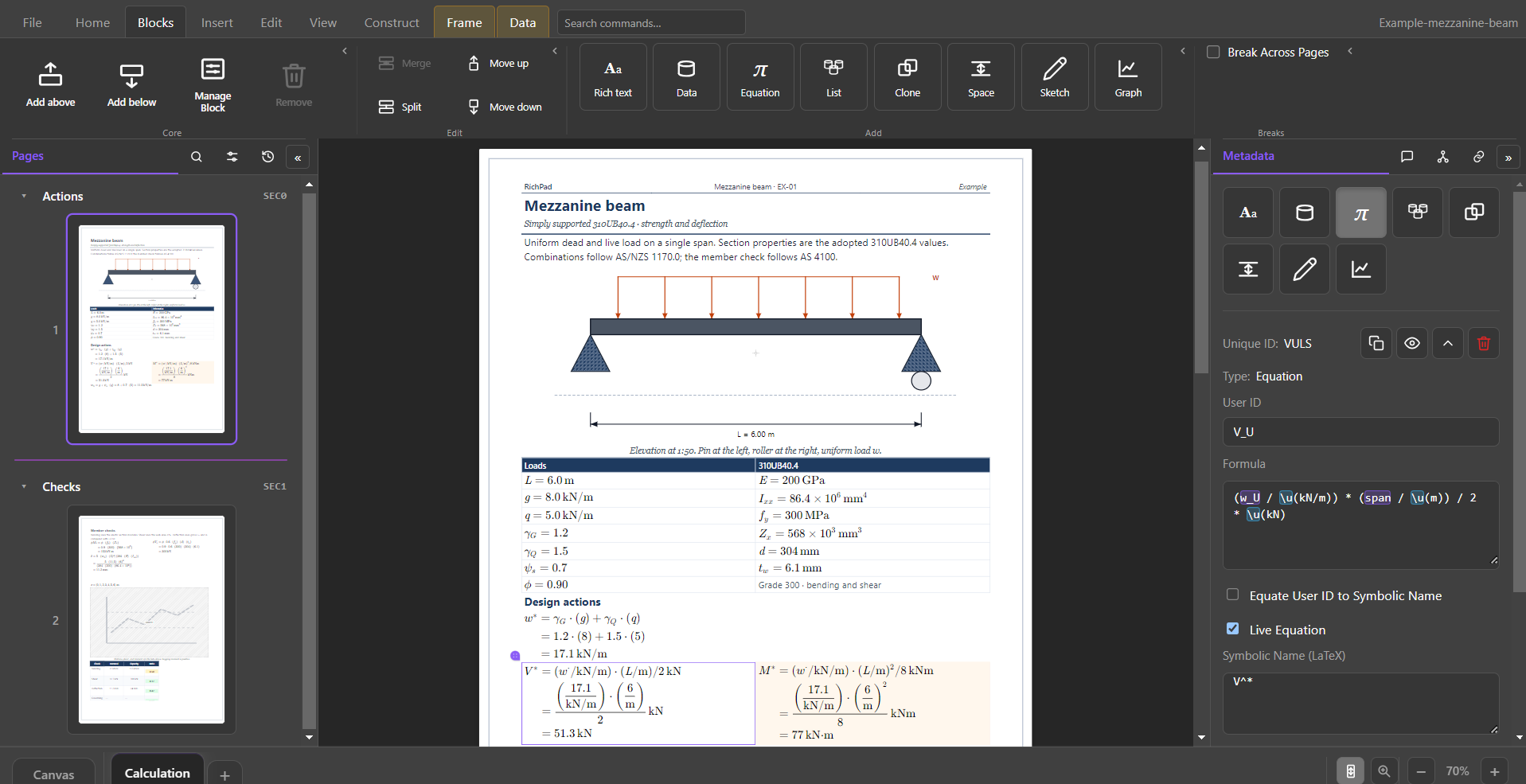
... and it has driven us to build a tool that combines the print-readiness of a paginated document, the computation of a spreadsheet, and the functionality that a technical document deserves. RichPad offers technical professionals a convenient place for simple technical reporting. Use RichPad for engineering calculations, back-of-the-envelope estimates, or your business as usual reports that need a few tweaks for each client.
Here’s how it works:
Beyond the basics
Ten other key features
The pages above cover the spine of RichPad. These are the capabilities that make a technical notebook feel like a finished reporting tool.
-
Present Fields
Toggle narrative placeholders into live computed values so the prose updates with the calculation model—no retyping numbers into the write-up.
-
Unit-aware math
Formulas carry and convert engineering units. Dimension mismatches surface as errors unless you mark a relation empirical.
-
Clone blocks
Live-linked copies of a block so the same definition can appear in more than one place—and stay in sync.
-
Headers & footers
Repeating multi-cell page bands with rich text, borders, and print layout for titles, revisions, and page marks.
-
Block templates
Save blank or content-filled block layouts and drop them from a template gallery when the next check looks like the last.
-
Block hierarchy
Parent–child and sibling links, with the Canvas Blocks menu to inspect how the argument is structured.
-
Tables that calculate
Cells hold text, equations, sketches, or graphs. Array results can spill across or down neighboring cells—spreadsheet power inside the page.
-
Python automation
Drive
.padfiles by User ID from Python: set inputs, read computed outputs, and save—without opening the UI. -
Named text styles
Document styles for headings and body—Edit Text Styles once, keep the note consistent everywhere it prints.
-
Comments & review
Anchored comment threads on selections so review stays in the document instead of a side channel of emails and markups.
Why RichPad
Built for technical reporting—not a workaround
Jupyter is flexible for computation. LaTeX is unmatched for typesetting. Office suites are familiar for documents. RichPad is the tool that keeps human-level math, narrative, figures, and print layout in one simple place.
| For technical reporting | Jupyter | LaTeX | Office suites | RichPad |
|---|---|---|---|---|
| Human-readable math that recalculates live | ~ Code cells / SymPy | ✗ Typesets; does not compute | ~ Sheet or static equation | ✓ |
| Unit-aware engineering formulas | ~ With libraries | ✗ | ✗ Manual unit handling | ✓ |
| Prose, calcs, tables & figures in one flow | ✓ | ~ Wired by hand | ~ Doc ↔ sheet ↔ drawing | ✓ |
| Print-faithful pages & PDF-ready layout | ✗ Notebook chrome | ✓ | ✓ | ✓ |
| Works without writing code or markup | ✗ | ✗ | ✓ | ✓ |
| Spreadsheet-smart tables on the page | ~ DataFrames / widgets | ✗ | ~ Power lives in the sheet | ✓ |
| Sketches & graphs stay with the calculation | ~ Plots; drawing is separate | ~ TikZ / external figures | ~ Linked or pasted objects | ✓ |
| Professional headers, footers & page marks | ✗ | ✓ | ✓ | ✓ |
| Reviewers can open results without a runtime stack | ✗ Needs kernel / export | ~ PDF yes; source no | ✓ | ✓ |
| One file—no doc ↔ sheet ↔ script handoff | ~ Plus data & env files | ~ Multi-file projects common | ✗ Split across apps | ✓ |
| Document UI—not a notebook or source file | ✗ | ✗ | ✓ | ✓ |
| Best fit for client-ready calculation notes | ✗ Exploration first | ~ Heavy for routine notes | ~ Calcs live elsewhere | ✓ |
- vs Jupyter — similar computational flexibility for human-level math, without asking reviewers to run a notebook or live in code cells.
- vs office suites — the calculation, narrative, and figures stay linked on the page instead of split across a document, spreadsheet, and pasted charts.
- vs LaTeX — report-quality output and real math notation, with a document UI instead of a markup toolchain.
Ready for Notes that calculate and print?
RichPad runs on your desktop. Your files stay yours.